🧰Tools 🗜️ Compression🔄 Conversion✏️ Editing📄 PDF Tools⚡ Optimization🌐 Web Tools🧰 All Tools (69)
📱 Android App 📝 Blog 👋 About

📊 Measured locally · August 2026 · data annex

Image Compression Benchmarks — Real Numbers

We encoded 39 test images 954 times across JPEG, WebP and AVIF, plus seven PNG strategies, and published every headline number. No vendor marketing, no hand-typed figures: every table below is generated directly from the raw measurement JSON at build time.

39test files
954measured encodes
-22.6%AVIF size vs JPEG q80
17×AVIF encode time vs JPEG

MethodologyMatched qualityJPEG ladder PNG strategiesSpeedFree toolsTakeaways

Compression advice is usually folklore: a blog post says WebP is “30% smaller”, someone else says 25%, and nobody says on which files, at which quality, or how it was measured. We got tired of arguing from vibes, so we ran the numbers ourselves and published them. This page is the data annex of this site: two local test campaigns — one from August 30, 2026 (27 real-world photographs) and one from August 31, 2026 (12 synthetic 1920×1080 frames) — all encoded on our own machine with open-source encoders.

The short version, for the impatient: at matched visual quality (~39.6 dB PSNR) AVIF q70 was -22.6% smaller than JPEG q80, and WebP q85 was -7.5% smaller. The JPEG sweet spot is real: q75–85 delivers most of the achievable quality for a fraction of q95’s weight. PNG photographs shrink through palettes and resizing, not through optimizer flags. And every byte of that size advantage has a CPU price: AVIF encoded the same batch 17× slower than JPEG.

Methodology

How we measured

Everything on this page comes from scripted, repeatable runs. The raw results live in JSON files, the charts are rendered from the same files, and the tables on this page are generated from them at build time — a number can’t drift away from its source.

📁 Datasets

27 real-world photographs (mixed subjects, normalized to a maximum width of 1920 px) plus 12 procedurally generated 1920×1080 frames — gradients, grain, silhouettes — used for the timing runs. 39 files in total.

⚙️ Encoders

Pillow 11.3.0 with libjpeg (JPEG, optimize + progressive), libwebp (WebP, method=6, the slowest and most thorough effort setting) and libavif via the pillow-avif plugin (AVIF, speed=6).

📏 Metrics

Exact file size in bytes, and PSNR against the original RGB pixels. PSNR medians were computed on a 12-photo subsample for the photo campaign and on 3 frames for the timing campaign.

📅 When & where

August 30–31, 2026, on one local machine. No cloud APIs, no uploads and no third-party service in the measurement path.

⚠️ Honest limitations

One machine, one encoder stack, medians that hide per-file spread, and PSNR as a proxy — a metric, not a verdict. This is a documented local test, not a certified lab. Your files will differ; the method is what we stand behind.

🔁 Reproducibility

Three JSON artifacts hold the raw measurements: per-file sizes, medians, PSNR and timings. Re-running the benchmark scripts regenerates every figure, chart and table on this page.

JPEG vs WebP vs AVIF at matched quality

Comparing “quality 80” across formats is meaningless — q80 means something different inside every encoder. The fair comparison is at equal visual quality, so we matched by PSNR: JPEG q80 is the anchor at 39.6 dB median PSNR across the 27 photos; the nearest settings for the other encoders are WebP q85 (39.2 dB) and AVIF q70 (40.4 dB). At that footing, the median file sizes diverge sharply.

27 photographs — medians at matched quality (PSNR target ~39.6 dB)
FormatQuality settingMedian sizePSNRvs JPEG q80
JPEGq80314 KB39.6 dBbaseline
WebPq85291 KB39.2 dB-7.5%
AVIFq70243 KB40.4 dB-22.6%

Deltas are computed on exact byte medians (JPEG 321,833 B · WebP 297,726 B · AVIF 248,979 B), before the KB rounding shown above.
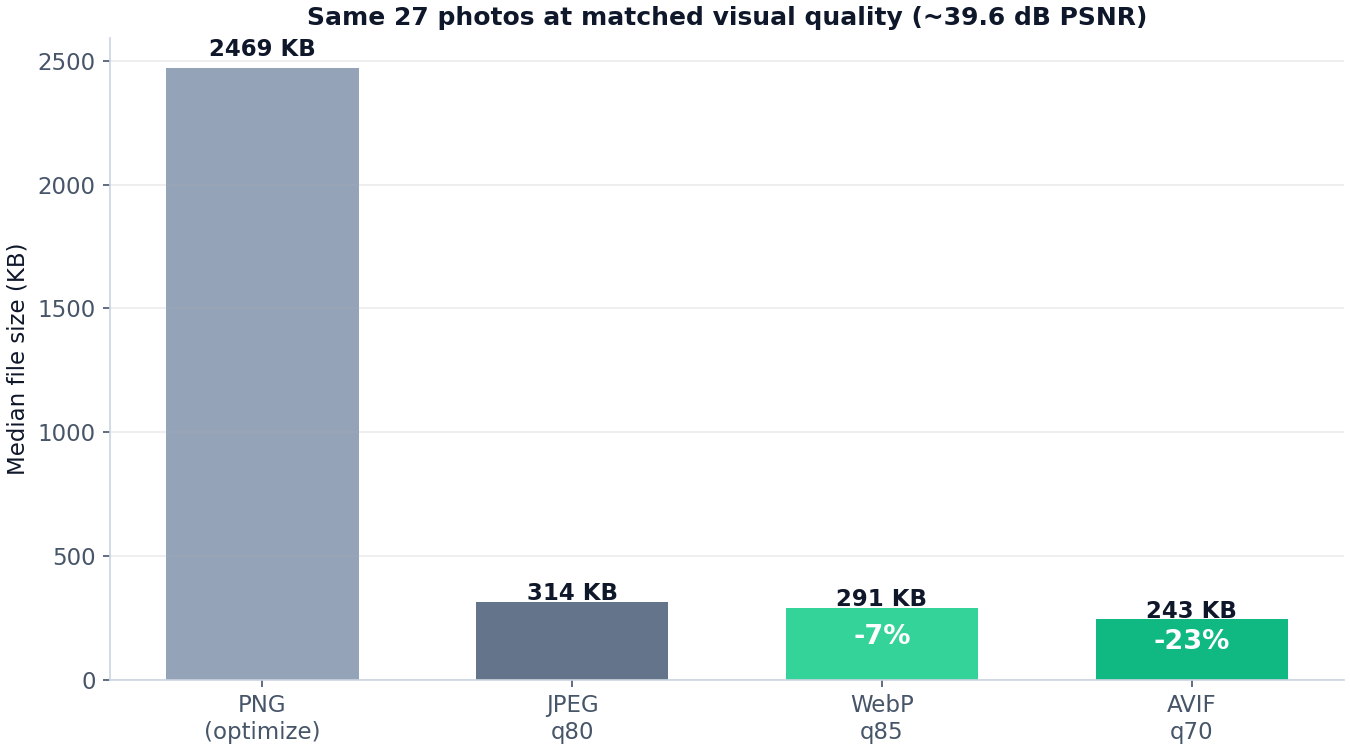
Bar chart of median file sizes: PNG optimize, JPEG q80, WebP q85 and AVIF q70 on 27 photos at matched quality
The same 27 photos at matched visual quality (~39.6 dB PSNR). Chart rendered from the raw JSON, not redrawn by hand.

AVIF describes the same pixels with roughly a fifth fewer bytes at this quality level — measured file-by-file on real photographs, not extrapolated from marketing. WebP’s smaller advantage at q85 is the cost of its simpler block model. If maximum compatibility matters, WebP still shrinks files decisively; if bytes matter most, AVIF is the measured winner.
The JPEG quality ladder

For the format everyone still ships, here is the full ladder on the same 27 photos: median file size and median PSNR at every standard quality setting from q50 to q95.

27 photographs — JPEG medians by quality setting
QualityMedian sizePSNR
q50198 KB33.3 dB
q60240 KB34.2 dB
q70273 KB37.2 dB
q75286 KB38.2 dB
q80314 KB39.6 dB
q85328 KB40.6 dB
q90359 KB42.2 dB
q95458 KB43.9 dB
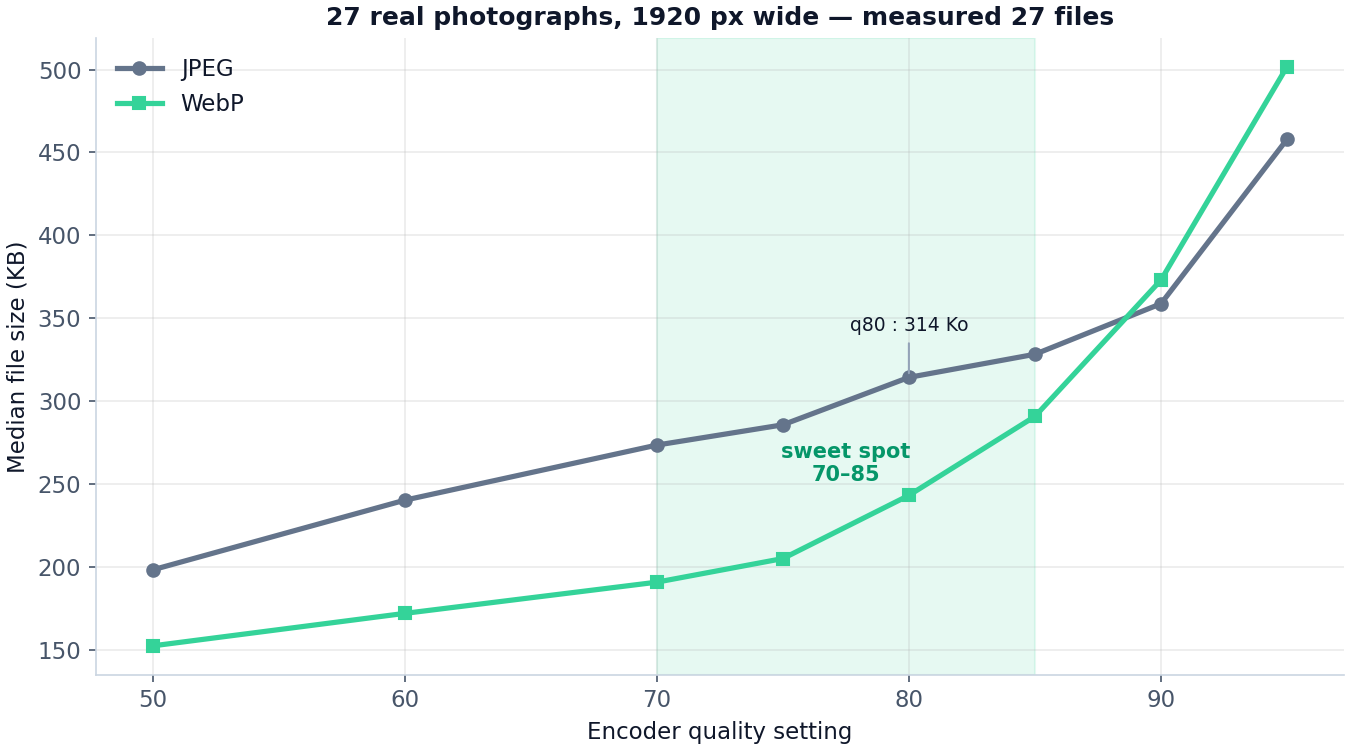
Line chart: JPEG and WebP median file size by encoder quality, 27 photos, sweet-spot band around 70–85
JPEG and WebP median file size by quality setting, 27 photos. The shaded band marks the 70–85 region.

The measurable sweet spot sits at q75–85. Climbing from q50 to q75 adds 44% file size but buys 4.9 dB of PSNR; climbing from q90 to q95 adds 99 KB (27.6%) for only 1.7 dB. Concretely, q80 files were 31% smaller than q95 files in our run — a saving most viewers would not spot on photographic content, with a PSNR gap of 4.3 dB. Dropping below q70 starts to cost real fidelity (34.2 dB at q60), so bulk pipelines rarely benefit from going there.

PNG strategies — what actually shrinks a PNG

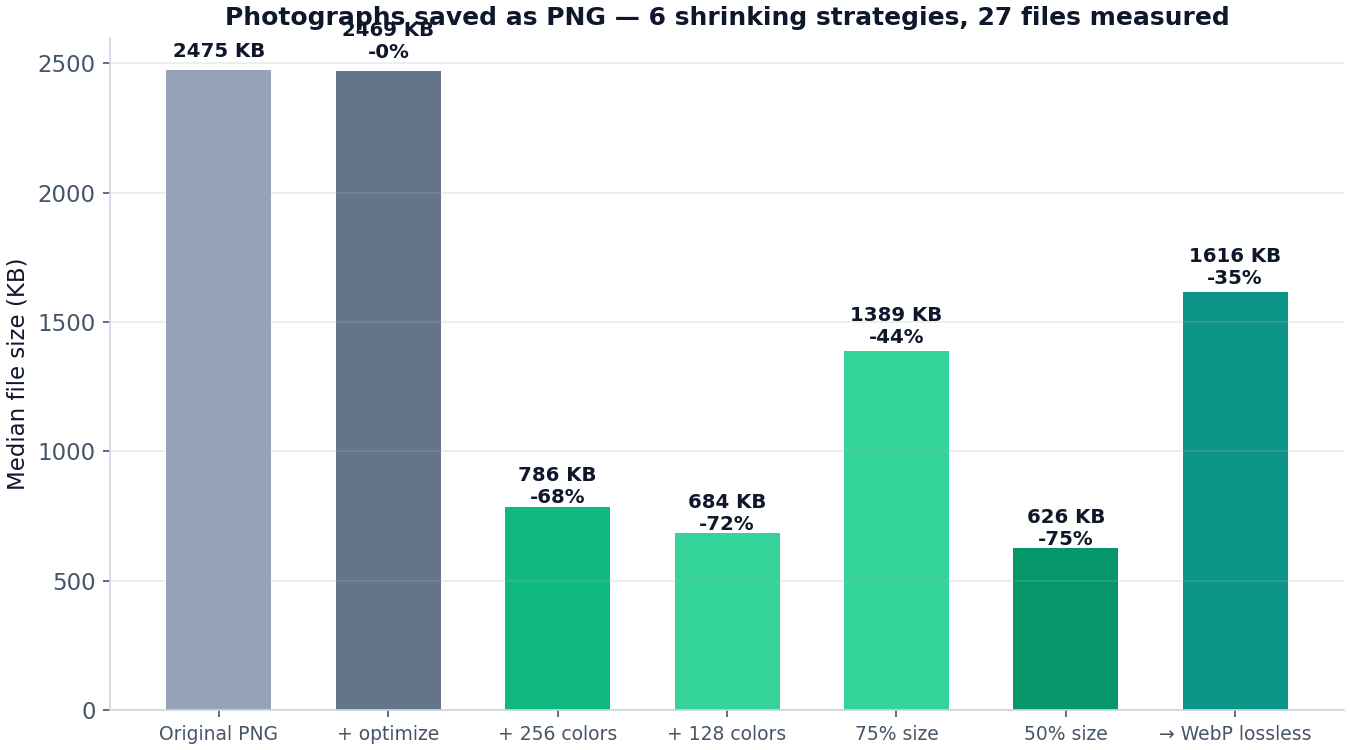
PNG is lossless, so an “optimization” can’t throw detail away — it can only change how pixels are represented: encode more efficiently, reduce the palette, or reduce the image itself. We saved the same 27 photographs as PNG seven ways to separate those effects. Note that the resized rows change the image dimensions, so they are a different trade-off rather than a free lunch.

27 photographs — median PNG size for each strategy (baseline = plain default export)
StrategyMedian sizevs baseline
Plain default export2,475 KBbaseline
optimize=True2,469 KB-0.2%
Palette reduced to 256 colors786 KB-68.2%
Palette reduced to 128 colors684 KB-72.4%
Resized to 75% of original size1,389 KB-43.9%
Resized to 50% of original size626 KB-74.7%
WebP lossless (format swap)1,616 KB-34.7%
Bar chart of median PNG sizes for seven strategies: optimize, 256 and 128 color palettes, 75% and 50% resize, WebP lossless
Median PNG size for the seven strategies across the 27 photos.

The lesson is blunt. optimize=True alone shaved -0.2% — the encoder was already doing the smart thing by default. Reducing the palette to 256 colors cut -68.2%; halving the resolution cut -74.7%. If the image must stay a lossless PNG, palettes are the honest lever; if it doesn’t have to stay PNG at all, WebP lossless (-34.7% smaller here) or a lossy format beats everything.

The separate timing campaign tells the same story on 12 synthetic frames: raw 24-bit PNG median 2,433 KB, optimize=True 2,228 KB (-8%), palette-256 1,048 KB (-57%), palette-64 665 KB (-73%).

Speed vs size — what the savings cost

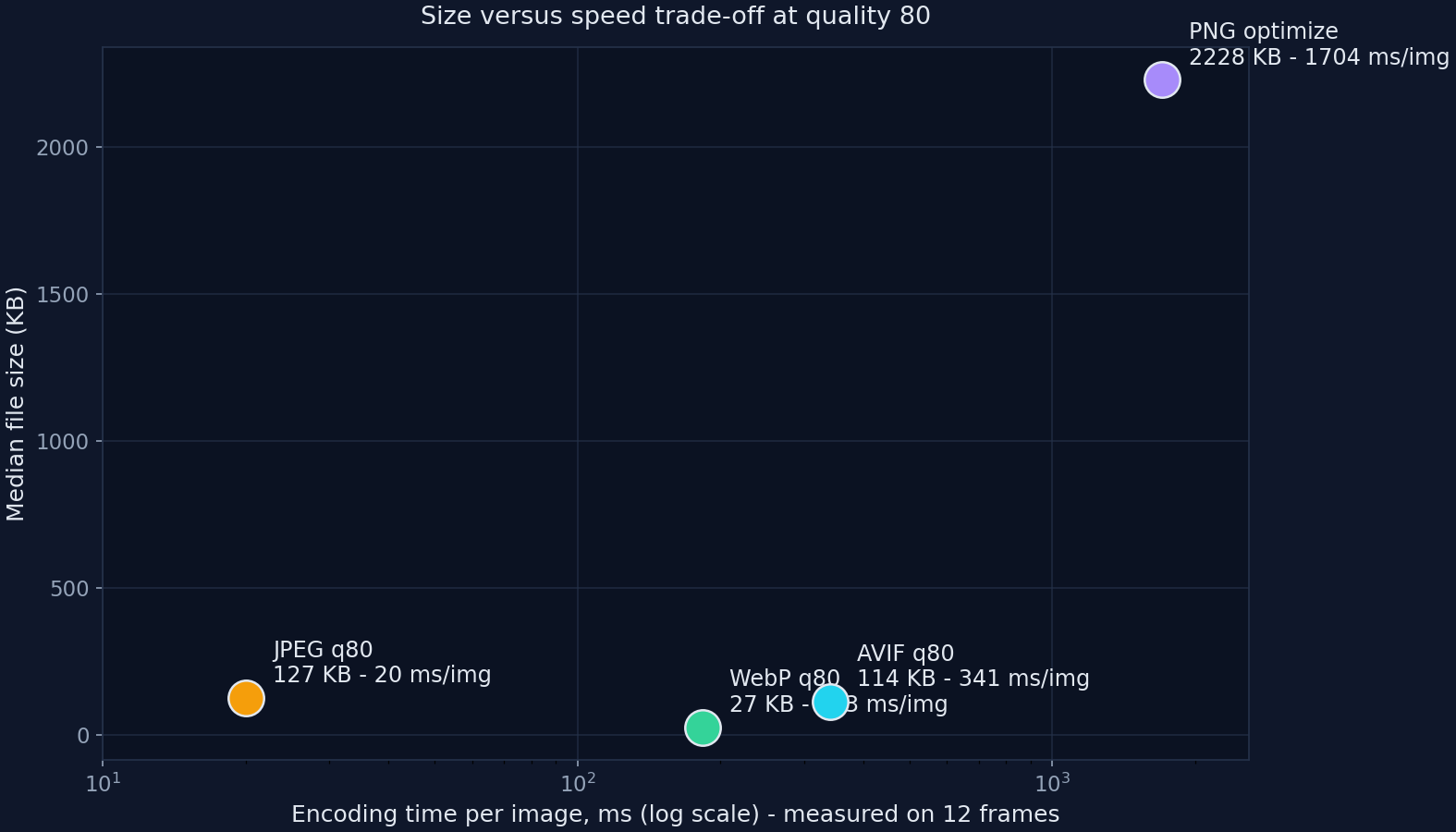
Smaller files are not free: the encoder has to think. We timed full 12-file batches at q80 on the 1920×1080 frames, wall-clock, in-process, same machine for every format.

12 frames at 1920×1080 — full batch encoding time at quality 80
Encoder & setting12-file batchPer imagevs JPEG
JPEG q80 (optimize, progressive)0.24 s20 ms1×
WebP q80 (method=6)2.20 s183 ms9.2×
AVIF q80 (speed=6)4.09 s341 ms17×
PNG (optimize=True)20.45 s1,704 ms85×
Scatter plot on log scale: encoding time per image versus median file size at quality 80 for JPEG, WebP, AVIF and PNG
Encoding time per image (log scale) versus median file size at q80 — 12 frames, measured.

AVIF took 4.09 s to encode a batch JPEG finished in 0.24 s — 17× slower, the exact price of its size advantage. WebP method=6 sat in between at 9.2×. Plain PNG with optimize=True was the slowest of all (85× JPEG) while saving the least. Read it as a deployment guide: AVIF for final exports and static assets where encoding happens once, WebP for a speed/savings compromise, JPEG when compute is the constraint. Absolute timings are single-machine; the ordering is the robust part.

How free online tools compare — documented limits, not our measurements

Popular “free” compressors come with constraints. To be completely explicit about method: the table below is research, not benchmarking. We collected publicly advertised limits from each vendor’s own pages and third-party write-ups; we did not measure these services, the limits can change at any time without notice, and none of the measured numbers on this page depend on them. Treat this as a snapshot of documented behavior.

Documented free-tier limits (as publicly advertised; not measured by us)
ToolDocumented free-tier limits
TinyPNGWeb app: up to 20 images per batch, 5 MB maximum per image. Developer API: 500 free compressions per month.
iLoveIMGFree batch processing limited to roughly 15 files per task; a paid plan raises the cap.
SquooshRuns entirely in your browser with no server upload; processes one file at a time.

Our benchmark tooling works the way Squoosh does — fully local — but with batch capability, and that is also how our own tools are built: files never leave your device during processing, and we impose no session caps or per-file MB ceilings; your browser’s available memory is the only practical limit.

Takeaways

Put the numbers to work

Ship the smaller format today

The same encoders measured above, running free in your browser.

Read the full write-ups on the blog: JPEG vs WebP vs AVIF — real numbers and JPEG quality 75 vs 85 vs 95 — a visual test.