By Dik Raci · Creator of online tools · About the author
How Much Can You Actually Shrink a PNG? We Measured 4 Levels
PNG has a reputation problem, and both sides of it are wrong. One camp treats PNG as untouchable - it is lossless, so any attempt to shrink it must corrupt it. The other camp assumes a magic compressor can make every PNG tiny without consequences. Neither belief survives contact with a measured experiment. So we measured: the same 12 frames, at 1920 pixels wide, saved four different ways with real settings you can reproduce, and we recorded the exact byte counts. The honest spread turned out to be 8% on the conservative end and 73% on the aggressive end - and knowing which end applies to your image is the entire skill.
Why PNG resists compression in the first place
PNG is a lossless format: every pixel you save is every pixel a reader gets back. It achieves reasonable sizes through a two-stage pipeline - prediction filters that turn pixel rows into differences, then DEFLATE compression that squeezes repeated patterns. That pipeline is extremely good at flat colors, sharp edges, text and repetition, which is exactly why screenshots and UI graphics compress well as PNG. It is structurally bad at photographic noise, because grain destroys the repetition DEFLATE feeds on. This is why the same 24-bit PNG of a photograph can weigh twenty times more than a quality-80 JPEG of the identical picture - in our test, the raw photographic frames averaged about 2.3 MB each as PNG.
The test: four levels, identical files
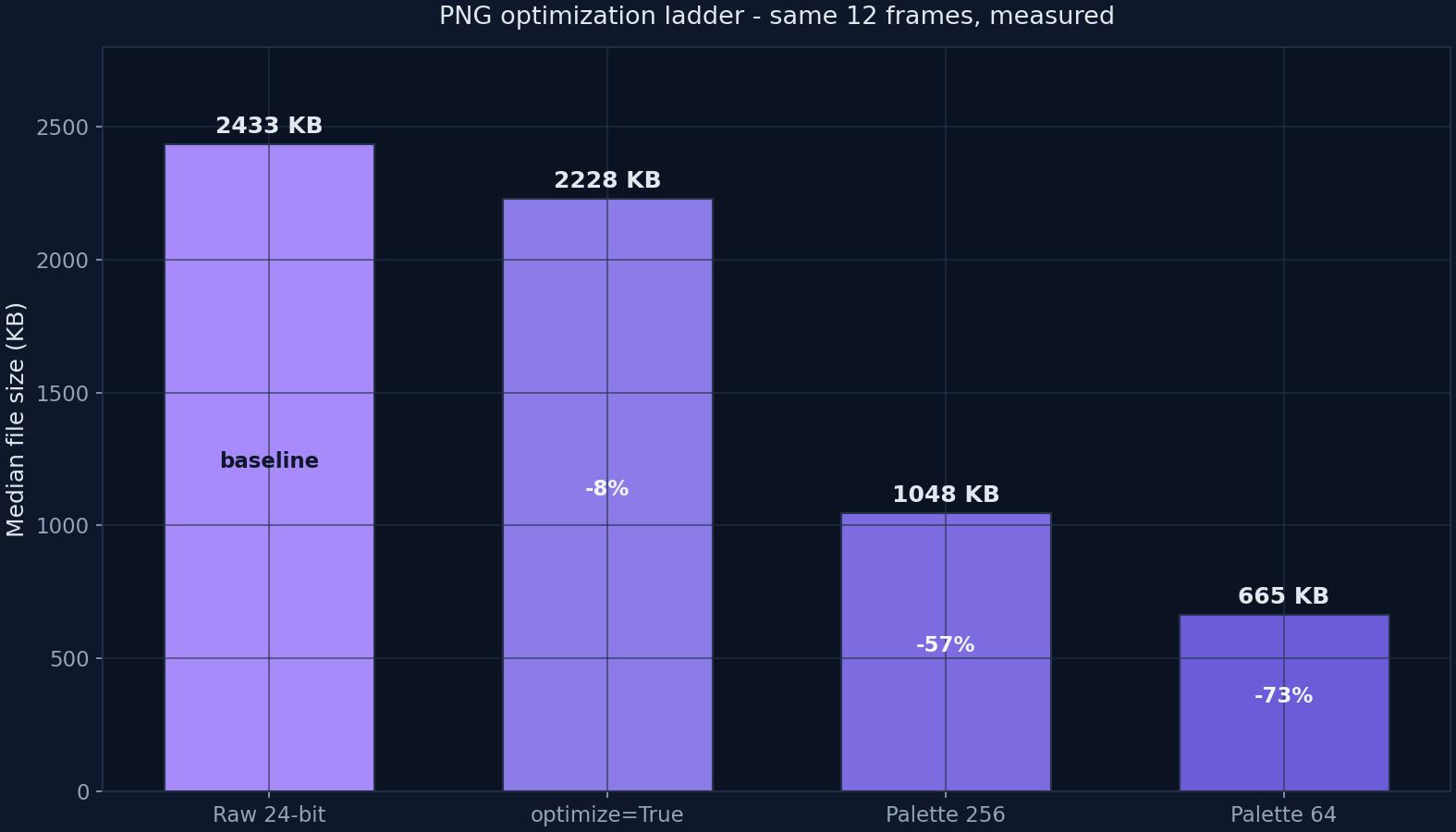
We took our 12 frames - gradients, terrain, silhouettes and calibrated film grain at 1920 × 1080 - and saved each one at four levels: the untouched 24-bit save, a filtered save with optimize=True (which lets the encoder search harder over prediction filters), a reduction to a 256-color palette with Floyd-Steinberg dithering, and an aggressive 64-color palette without dithering. Every value below is the median of 12 measured files, produced with Pillow 11.3 on August 31, 2026. Because the sources are losslessly reproducible, you can regenerate the identical corpus and validate every number yourself.
| Level | Setting | Median size | Versus raw | Who should use it |
|---|---|---|---|---|
| L0 | 24-bit raw save | 2,433 KB | baseline | Nobody in production - this is the starting point |
| L1 | optimize=True | 2,227 KB | -8% | Anyone shipping PNG as-is today; free wins, zero risk |
| L2 | Palette 256 + dithering | 1,048 KB | -57% | Screenshots, UI shots, illustrations with limited palettes |
| L3 | Palette 64, no dither | 665 KB | -73% | Flat graphics, icons, logos, simple diagrams |
Medians of 12 measured encodes. L2 and L3 are lossy (color count reduction) - always eyeball the result before shipping.
Level 1 - the free 8% nobody collects
Simply enabling the encoder's optimization pass shrank the median file from 2,433 KB to 2,227 KB: an 8.5% saving with a mathematically identical image on the other side. This is the most overlooked setting in web delivery, because the saving looks too small to matter - until you multiply it. A tools site serving a few hundred PNG screenshots per month is shipping tens of megabytes of avoidable weight for the cost of one checkbox. There is exactly one catch, and we measured it in the same run: the optimization search is slow. Those 12 files took over 20 seconds in total, roughly 1.7 seconds per image, against about 20 milliseconds for a JPEG encode. For a build step, fine. For an on-the-fly converter, you will feel it.
Level 2 - where the real money is
Reducing to a 256-color palette cut the median to 1,048 KB - 57% below raw - while keeping dithering to disguise the reduced palette. This is the workhorse level for screenshots and interface captures, which rarely contain more than a few dozen true colors plus anti-aliasing. The dithered edges survive, text stays legible, and halftone noise replaces banding in gradients. The loss is real - 232 colors of nuance are gone - but on typical UI content it is invisible at normal viewing sizes. This is the level we recommend as the default first attempt for any screenshot heavier than a couple hundred kilobytes.
Level 3 - the aggressive end and its cost
Sixty-four colors without dithering produced the smallest files: a 665 KB median, 73% below raw. But this level is where content type matters most. On flat illustrations, logos and diagrams it is routinely indistinguishable. On our gradient-heavy frames it was visibly not: banding appears in skies and smooth surfaces once dithering is switched off, because 64 steps cannot represent a continuous tonal ramp. The workflow that works: try L3 on flat graphics, keep L2 for anything with tonal gradation, and never apply either level blind to a photograph - at that point the correct tool is a lossy format, not a crippled PNG.
The decision table we actually use
- Screenshot or UI capture over 200 KB: L2 (256-color palette with dithering) - typically halves the file with no visible cost.
- Logo, icon, flat diagram: L3 (64 colors, no dither) - the file often lands under 100 KB and stays pixel-crisp.
- Photograph saved as PNG: stop - switch to WebP or JPEG around quality 80; our companion benchmark measured those at 27 KB and 126 KB medians versus 2.2 MB for optimized PNG.
- Any PNG you cannot re-encode: L1 (optimize=True) still collects the free 8%.
- Transparency required: PNG or WebP stay your formats - palette reduction preserves the alpha channel in our runs.
One more option most guides forget
For lossless delivery, PNG is no longer the only codec. WebP's lossless mode compressed photographic content 25-34% smaller than optimized PNG in published encoder tests, and it keeps full reversibility. If your pipeline can output WebP lossless, measure it against L2 PNG before deciding - on our frames, palette reduction often still won on size, but WebP lossless wins on tonal fidelity at similar weights. The right answer, as always in this field, is a measurement and not a habit.
Frequently asked questions
Is compressing a PNG lossless?
It depends on the method. Filter optimization (optimize=True) is mathematically lossless - the decoded pixels are identical. Palette reduction to 256 or 64 colors is lossy: colors are merged and, on our gradient-heavy frames, banding appears without dithering. Our measured L2 level halved files this way, which is why we recommend eyeballing any palette-reduced PNG before it ships.
Why is my screenshot PNG so heavy?
Screenshots often contain photo-like elements - wallpapers, browser rendering of images, subtle window shadows and gradient fills - that defeat DEFLATE's pattern matching. A pure UI capture compresses beautifully; one with a photo in it behaves like a photograph. For heavy screenshots, our measured palette-256 level cut median size by 57% with dithering hiding the difference.
Does palette reduction keep transparency?
Yes. PNG's alpha channel survives quantization in standard encoders, which is why palette PNGs remain the workhorse for logos and interface icons that need transparency. Our test files carried alpha through every level. The thing that does not survive is tonal nuance - 256 colors is simply fewer colors.
Should I convert photographs from PNG to JPEG or WebP?
If the file is a photograph, almost always. The same frames that weighed a 2,227 KB median as optimized PNG measured 126 KB as quality-80 JPEG and 27 KB as quality-80 WebP in our companion benchmark - roughly 94-99% smaller with fidelity the eye accepts on photographic content. Keep PNG for transparency, text sharpness and pixel-exact graphics; switch to lossy formats for everything photographic.
Is WebP lossless a better PNG replacement?
It can be. WebP's lossless mode typically lands 25-34% below optimized PNG at identical fidelity, and it decodes faster in browsers. In our runs, PNG palette reduction still beat it on raw size for reduced-color content, but WebP lossless wins when you need full tonal fidelity at a smaller weight. Measure both on your own files - the winner changes with content type.
Try CompressoPanda Now
Practical image processing with an output you should review before publishing.
Related Articles
WebP Format Guide
What WebP is, when it beats JPEG, and how to check the output.
Optimize Images for Web
The complete performance guide: formats, sizing and delivery.
Reduce PNG File Size
Practical ways to shrink PNG files without breaking transparency.
Image SEO Guide
How image choices affect search visibility and rankings.